Sunday, September 30, 2007

IPhone review

d3xlabs - Hi everyone, allow me to introduce to you, a review by a good buddy of mine, my guest blogger... with the Apple iPhone review. Enjoy...


There're already tonnes of iPhone reviews on the net so I'm just going to stick with the more personal experiences. (For a really indepth review, look at arstechnica). Do keep in mind as you're reading this, I've become much of a mac buff since I picked up a black macbook about a year ago.

The usual suspects

Stacked against Treo, Nokia and Ipods
First off, this thing is thin! It feels like a well crafted luxury item (say, like a Rolex?). Seamless and perfect cuts round each corner. Its something you can't appreciate until you hold it in your own hands. The metal and glass mix really takes the device to another level, downgrading every other plastic phone you've held. Needless to say, it passes the "twist" creak test and makes you feel silly you even tried. It LOOKS fragile, but in your hands, it feels like it can really take a beating. The week as gone by without a case, and not a blemish to be found. I'm not planning to get a case.

Work of art
Unlike a Treo, it slips discretely into your pocket so you can forget about as you go about your daily routine. Comfortable in jeans. That's something hugely refreshing being a Treo user for 3 years. You'd also know by now that the back of the phone is a matte metal, a welcome change to the scratch magnet that the iPods are. The weight feels just nice.

Polished vs Matte
Software
Much like switching to the Mac, the first few days can drive you a little nuts. (If you're never tried a Mac, walk into AV and mess with an iMac for a while.) Everything works a little differently, and sometimes, its frustrating because you don't know how to do the simplest of tasks.
Right off, you'll notice it takes more steps to do phone stuff.

For instance, to place a call on the iPhone:
  1. Turn on phone
  2. Slide to unlock
  3. Press Home button
  4. Touch Phone icon
  5. Touch Contacts or Favorites
  6. Scroll to Contact (arranged by last name)
  7. Select Contact Name
  8. Touch phone number to dial
On the Treo:
  1. Press power
  2. Press Center key to Unlock
  3. Type Contact initials
  4. Select the Contact to Dial
Woah. 8 steps. Though, Apple makes sure that each of those 8 steps are as sensuously delicious as going through phone menus can possibly be. Going into the 4th or 5th day, I'm still amused by the detail they put into the graphics and animation. Elegantly done.
For the most part, you'll find that tasks are quickly and easily done.


Phone
Reception is on par with a Treo, which is a little worse than a Nokia. Voice quality is above average, clear and pronounced even in noisy environments. The interface is basic but straight forward and easy to navigate. Place speed dials in "Favorites" and you're set to go.


Brunei: SMS Nation
I can't live without threaded SMS chat. If you're still using Inbox style SMS, you're really missing out. iPhone pulls off SMS chats beautifully. Its easy to scroll back through the conversation. My only disappointment is that you can't delete individual messages. You'll have to delete the entire thread. Not a problem MOST of the time. If you have someone send you a password or some ugly sms chain text picture thingies, you can't individually delete them and keep the other messages. Annoying.

Oh, and no Character count! With $0.03 sms's, it doesn't bother me much. But I know it'll bother some of you.

While I'm in this topic, I might as well talk about the keyboard. All the other reviewers weren't lying. Google "Iphone review keyboard", and they all say you get used to the keyboard after a while. Not as good as a physical thumbboard, but not far off. Don't let first impressions fool you, and trust the Autocorrect.
Two handed (or thumbed) typing is easy, although the standard index finger hunt and peck is more precise. Both styles work and are fast enough.


Killer App
Steve Jobs is wrong. The killer app in the iPhone isn't the Phone. It's the Photo viewer, the perfect extension to iPhoto (on the Mac). Just as with any iPod, iTunes will optimise the the pictures before uploading it into the device. Its strange. The experience is fresh, yet, nostalgic. Its like flipping through the printed 4R photo albums of old, except digitally.
Doing the reverse "pinch" to zoom in is the No.1 show off factor.

Its lengthy to describe in words so check out this movie in apple.com

The Party in "Third Party"
The good news is that in Brunei, you'll be sporting an Unlocked iPhone. This means you'll have access to the 'Installer' app. This will appear as the 13th icon in your virgin iPhone. Open it up and it lists hundreds of 3rd party items you can download directly in Installer and load it up. I recommend to install Summerboard as your first stop. This allows you to scroll in the main menu and choose from a flurry of themes. My current fav is "Space" as seen below. The pics in the preview post d3xlabs put up are using the "Tiger Basic" theme.

Tiger Basic - side by side with the original menu
Space theme
Son of iPod
Best iPod ever? I'd say, Yes. I'm no audiophile, but music sounds as good as on my 5.5G iPod. Browsing my music and podcasts is easier, and coverflow is lots of fun. I'm more inclined to scroll through some older music I've neglected. I have to re-encode some divx movies to put them on, but they turned out absolutely gorgeous!
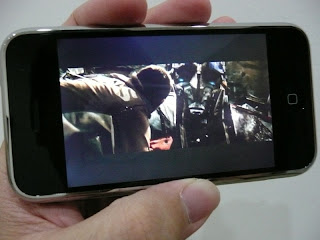

Transformers 2007 (Full Length - 1GB) encoded in H.264
Check out music on the iPhone.

The Real Internet
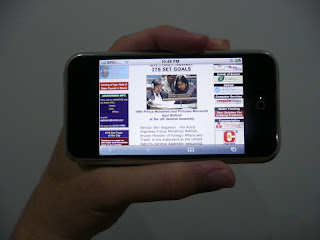
Apart from the fact that there's no Flash and Java (which is different from javascript), Safari works incredibly well! Brudirect loads up just fine, and easily navigated. Wifi has never been so useful. ApolloIM fills the gap if you get on MSN or Yahoo. Its still an early build, but lots of potential.
Email, on the other hand, just scrapes by. It works. Having used push email, I feel cheated, but I'll survive.
Brudirect

Others
Camera is nothing spectacular. The 2MP cam is a lot better than Treo, and probably on par with standard Nokias, Motorolas and Samsungs out there. Great pics as long as you have good strong lighting.

Games are sparse, but we have NES, Sudoku, Blackjack and Minesweeper for a start. Bejeweled can be loaded off the internet. This are can only get better.

The stock calendar app does the job. Simple. In my experience, the simpler your time manager, the more likely you'll use it.

Youtube and Googlemaps have never been so good on the phone if you're on wifi. They're completely useless with the slow GPRS/EDGE speeds on DST.

Conclusion
Am I happy? Yes.

But I wouldn't recommend to Treo or other smartphone users. The iPhone, like the Mac, is good with "life" stuff, and just passable for business use. There's no way to save or edit Office documents (only view via email or web). Its hard to scroll through more than 500 contacts. There's no push email (no Exchange or Blackberry support). And limited sync with Outlook.

In brief, its the smartphone for casual users. I believe that is how Apple designed it, and they did a pretty darn good job. If you carry an iPod on a daily basis (like me), I recommend it whole heartedly. Otherwise, it falls in the 'worth a good look' section.

Feel free to post comments/questions, and I'll answer them as best I can.

Friday, September 28, 2007

Preview - iPhone, iPhone!

I'm back! Keeping busy over the past few days checking out new phones as usual... but, before I post updates on what new releases there are.... I have had the chance to actually see / feel / touch / play the ONE phone that the whole world has been waiting for! So, I'll post this first!

I'll let pictures speak louder than my words....

Ladies & Gentlemen...

The Apple iPhone.

The famous logo we ALL know and love, on the back...

iPhone next to the "other" best phone in the world..

iPhone in hand

iPhone back

iPhone menu

iPhone side view (ain't it slim)

Proof that I'm not pulling a fast one on you....

AND

One cute one just for kicks...


No, its not mine, in case some are wondering... but a good buddy's of mine. You MAY remember him (click here), when I introduced him as the Treo Godfather many moons ago. Well, that he ain't anymore. Now that he has switched sides, I have asked him to be my guest blogger again in posting his review of the greatest mobile invention of the century. Its going to be good.

Stay blogged....

Monday, September 24, 2007

Back to basics...

You know, there comes a time when you look back and suddenly shock yourself that another whole month has passed, just like that! Unbelievable.

Since my last post, there's been so many things going on. Work's definitely one of them, but the main thing this past month has been the amount of travelling I've been doing. I've been MIA (missing in action) because I was in Kota Kinabalu on one weekend, then Adelaide, Australia for about 10 days the week after.

Having just returned from the Land Down Under (and having the time of my life), let me post a couple of photos taken from KK the week before I left. I just HAVE to post this....

These shots were taken at a boutique hotel I stayed in KK. I knew I HAD to snap them. I mean, who USES phones like these nowadays!? Funnily enough too, I actually received a room call, and (for the phone on the top), it took me a good few seconds to figure out which was the ear-piece and which was the mouth-piece! For the life of me, I just couldn't figure where to speak into! My friends really had a good laugh. I think I'll stick to mobiles. The're alot simpler.

And, just before I end this brief post, just to update my fellow E90 counterparts out there, I'm not using my E90 anymore. This probably won't surprise anyone, but I'm back to my previous Treo 680, but in CRIMSON, like the one you see below. Its a long story, but I bid farewell to (perhaps) one of the best Nokia smartphones in the market today. I'd still recommend it to anyone.

ANYWAY, back to the adventures of using my Treo. Ol'faithful as they say....

Saturday, August 25, 2007

My Nokia E90 review


I have FINALLY been able to complete my Nokia E90 review. It has been a month plus of getting to know my E90. Sadly, its also been a month plus since my last review. But, the good news is, I'm done with house moving, and dealing with the paperwork, so I can redivert my attention back to the doing what I love to do. I'll be doing it on a mac from now on. Got rid of my old PC and good riddance to windows.

As an introduction to the E90, I have to begin by acknowledging the Communicator series since Nokia first released the 9110. Then of course came the better improved versions; 9210, 9210i, 9500, 9300 and 9300i, each maintaining its own ground as the flagship model for Nokia. But the one thing that constantly remained with this series; its size. BUT, having said that, hardcore Communicator loyalists still continue to stand by their devices, fiercely protecting and defending their "brick phones" to the very end. Its perhaps because of this niche market consumer that the Communicator series still thrives amidst the many competitors today.

Back to the E90. Its been a joy using such a complete device. Just by my saying that, its probably then quite obvious what my take is on it. I was surprised myself. I've been telling everyone, it has brought back my faith in the Communicator series. Comparing between E90 and 9500, there have been SO many changes and feedback throughout the world. Some bad (very minor) but mostly good responses. So, if you're an existing 9500 owner and you're waiting to take that jump OR, if you're a first time potential Communicator buyer, read on. I hope it helps.

Please note though, there are NUMEROUS reviews out already on the E90, I will try not to regurgitate what they have all mentioned, but I will try give you a more personal hands-on approach in this review. Especially for us here in Brunei. Afterall, I have been spending a month plus with this E90 as my daily workhorse, what else can it do to surprise me?

Inbox


1 x Nokia E90 unit (Red Edition)
1 x BP-4L Battery
1 x AC-4E Nokia Charger
1 x 512MB MicroSD memory card
1 x DKE-2 mini USB Cable
1 x HS-47 stereo headset
1 x Eseries Leather pouch
(New buyers, watch out for this. If you buy from Incomm, this is included in the box. I've heard from others who bought it from other shops, this leather pouch is NOT included! Don't be cheated just to save a few dollars)
1 x suede cloth (for cleaning the screens)
1 x User Guide and other reading material
1 x Nokia PC Suite CD-rom


First Impressions
When the E90 (finally) arrived on our shores, I was immediately notified of it. I still remember the date. 4th July 2007. It was in the afternoon I received that fateful call. Anyway, as you would expect, I rushed to Incomm right after work to get it. I thought I could be the first to own one in Brunei, but alas, another buyer with a red E90 was already sitting there admiring his new purchase. It was not meant to be. Oh well, being the SECOND person isn't that bad I suppose. Given a choice between the mocha or the red, I sat there pondering for a good few minutes. The staff were as helpful as ever, and the decision was unanimous, RED it was. I immediately slipped in my sim card, fired it up (it was a faster start up compared to the other S60 3rd edition devices I've reviewed earlier)(A good sign) and was immediately blown away by the resolution. I remember back when I first used the N80, and was taken aback with the fantastic screen resolution of it. The E90 was just like that, but much better, it was WIDESCREEN. You will never be able to find another device out there with such a glorious display for you to drool over. So right in the shop (I hadn't even paid for it yet), I began going through all the application folders which was easy, since Nokia's S60 menus weren't foreign to me. My first impressions of the E90 was that it was F-A-N-T-A-S-T-I-C.

Physical Aspects / Build Quality
Please see here for my previous photos of the E90 close up.
My E90 in handTop of E90
Bottom of E90
E90 vs 7373 opened
E90 vs P1 side by side
E90 vs P1 close up
E90 vs P1 standing
E90 vs P1 size
E90 QWERTY close up

For photo comparisons of E90 vs 9500 vs 9300, see here.
And yes, this is the P1, next in line for review.
  • As previously mentioned, the Nokia E90 comes in only two colour variants for now; Mocha and Red. It has a (considerably big) candy bar form factor that opens up with very solid hinges, to a QWERTY interface underneath. Made from a combination of metal and plastic in both the colour variants, the E90 is built well. The external keypad is located literally in the centre of the device, with chrome borders surrounding it. It would seem on initial use, that there are loads of empty spaces which Nokia could have utilised, but after long term use, I've decided that its just nice. ESPECIALLY now that T9 is (finally) included.
  • Opening up the E90, you will see the very familiar QWERTY keyboard reminiscent of the previous Communicators. I won't touch too much on this, as its not "new". But I will say that the keyboard tactile feel / feedback is good. I've tried typing using both hands to hold the E90, whilst my thumbs worked away at the keyboard. I've also tried placing the E90 on the table and using my index fingers to type. Which feels more comfortable? For me, I preferred holding in both hands to type. Initially, I was a bit slow, since the size of the keyboard is significantly bigger than my previous Treo's, but after a while, it became easier. And I eventually ended up finding any reason to open up the E90 just to use the keyboard. Well, obviously I have no complaints here.
  • On the back of the E90, you'll see the big battery cover, the 3.2mp camera lens and a LED flash light. That's pretty much it.
  • On the bottom, you'll see the mini USB connector point, the new Nokia series mini battery charging slot and the headset slot. The mini USB is a much welcomed inclusion by Nokia. Gone are the Pop Port era days of previous Communicators. The mini USB now makes transfer of data very fast and simple. I always thought the Pop Ports before weren't as secure as it could be. Now, with the E90, this won't be a problem.
  • On the right side, you will only see two buttons; the voice recorder button and the dedicated camera button. I didn't like the voice recorder button to be honest, as I often ended up accidentally pressing it whenever I take the E90 out of the belt leather pouch. The Camera button however, I will mention though, is deceiving. In standby mode, by pressing it, nothing happens! As hard or often as I pressed it, still nothing! I thought this was a software issue, and tried other sets when I was at Incomm. All the same. You'd need to go into the menu, under Media, find the Camera launch app THEN only will you be able to start snapping away. So what I did was place a shortcut on the active standby icons. After that, as I will mention later under Camera quality, you can start snapping away at will.
  • Holding the E90 in hand, it feels VERY good and VERY solid. It almost seemed as if the E90 was made for hands ike mine. It was very comfortable to hold, and talk on.
  • Overall, I'd say the build quality is excellent. Forget the changeable covers like the 9500 had. That just opens up avenues to let dust creep into the inside screens, which I hated alot with the 9500.
Display / User Interface
  • The E90's external display screen is 240 x 320 pixels with 16million colours whilst the main screen is a GLORIOUS 800 x 352 pixel screen with 16million colours also. In short, it just blows you away. The clarity, sharpness, the fonts... I could go on. Viewing photos and videos were a real pleasure too. In this review, I'm trying something new by including photos of the key menu screen shots. (I found a software that lets me do this on any Eseries device. But, I chose to include only those of the widescreen, not the external one).
E90 Active Standby Screen


E90 Main Menu Screen

E90 "Tools" screen
  • I won't touch too much on the user interface, sporting a S60 3rd edition Symbian menu. Basically, you'd see the same thing throughout the Nseries and Eseries ranges. But, just to mention what many reviews have brought up issues on, Nokia has been accused of downgrading the Communicator class by using S60 instead of upgrading the S80 version found on the previous communicators. There are a few minor differences between the two, for. e.g. on the 9500, there was fax, there were "timed sms's" (i.e. you could choose to send an sms at a predetermined time), there were also a few navigational shortcuts, but now on the E90, all these are absent. I don't have an answer to this, but I will say, overall, as a S60 device now, the E90 is definitely a more improved device over the 9500.
  • You are also able to download themes, change wallpapers and the like on the E90. Personally I prefer the white theme which you see throughout my screenshots. You can find the theme here. (Incidentally, this link also gives good tips on improving the use of the E90)

Calls / Messaging
  • I won't touch on call quality in detail as I have no complaints about E90's calls / loudspeaker performances.
  • Messaging wise, the E90 supports the full onslaught of communication capabilities; SMS, MMS, Email, Instant Messaging etc. The widescreen and full keyboard truly bring out the best in this feature. To be able to read your entire email / SMS on one screen is really something else. There are settings which also allow you to resize the fonts on the E90 as well, but unfortunately, none to actually change the font type. The E90's fonts are all clear and crisp so there's no need to change them anyway, in my opinion.
E90 Messaging screen


Multimedia / Camera performance

E90 Media screen
  • As with other Nokia S60 3rd edition devices, the Music player is, I would consider, quite satisfactory. I personally believe Sony Ericsson has a foothold in the music scene for mobile phones, meaning, Nokia hasn't come up with any device that can knock SE off its pedestal yet. Meaning also, the E90's music quality is quite standard, and would satisfy any (business) owner. All your preferred songs will loud enough. And the quality from the stereo headset is also good. Just, not SE Walkman-beating thats all. One thing I will add though, is that when opening up the E90 to access the Music Player, the first thing that hits you is how big the size of the app seems on the widescreen. Other worthwhile mentions; Radio and 3D tones. I didn't bother playing with these features very often I will admit. But with 3D tones, IF you have the time, it could be fun to hear your tones with stereo effects buzzing around you I suppose.
  • Touching on video capabilities. There's the default Real Player, again, standard with all Nokia's these days. BUT, I MUST recommend visiting this site here. (Its also in my blogroll) I've been able to get acquainted with another fellow E90 owner, with a blog specific to E90. Its a cool site. One of the daily blogs I check out. On this site, under the post here, you will see the full glory of the E90's video playing power. It will blow you away. I've downloaded the clips myself and I must say, nothing else compares. See for yourself. And on videos taken with the E90, the quality is also very good. No complaints here at all!
  • Camera wise, E90 sports a 3.2mp CMOS with LED flash. You will get the standard adjustable settings as with other image-centric Nokia's, like the N73 or even N93i, so no surprises there. The BEST thing I loved about the E90's camera is that it has autofocus. This feature alone is a huge jump from the 9500's VGA efforts. I'm happy to say the E90 can probably replace the most basic digital camera you may have! And with this, I'd like to let photos speak for themselves.
A sweet wrapper
Teh Tarik from a local restaurant
A "macro" shot of a charger in a dimly lit room
A personal favourite shot.
All these taken from a local Beach resort hotel.

  • I HAVE to add, I am very impressed with the camera quality of the E90. I found myself using it extensively, just for the heck of it sometimes. Snapping away at anything, everything and anyone. Sometimes I still shake my head in awe whilst browsing through the images.
What I loved about the E90
  • First of all, the screen size. Other mobiles PALE in comparison to the (wide)screen size of the E90. Other mobile screens suddenly seem so "small" after using my E90.
  • The battery life is phenomenal for a device of this calibre. With my usages, I went for about 3 days on a single charge. And that includes, calls, SMS's, emails, photo moments, music playback, wifi surfing, MSN chatting, video viewing... (I can go on)
  • Being a 3rd edition S60 device, there are loads of 3rd party applications out there which made my E90 life a whole lot more fun. There's a "Download" link on the main screen which allows E90 owners to download other cool apps online from Nokia's Catalogue. Very handy. You have games like GlobalRace and universal-use apps like WorldMate. (Very cool for time zone comparisons, alarms, currency exchanges etc). I even dabbled with other apps for MSN which, again, looks fantastic on a widescreen.

  • The connectivity options on the E90 is just so complete comparing to other devices out there now. Bluetooth, infrared, Modem, USB connection, Internet call capabilities and best of all, WLAN. (I won't bother mentioning GPS, Maps or PTT since in Brunei, we can't use them. Pity huh). Anyway, I've tested the Wifi on my home networks and on other networks from local cafes / centres. No problems encountered. It was real handy on many occasions to have wifi around, but of course, personally, nothing beats surfing on an actual desktop or notebook. File transfers through Bluetooth is also seemless for your info.
E90 Connectivity screen
  • The Active Standby Screen. I've always loved Nokia's interface on this. Totally useable and easy to use. To be able to see all my appointments / To-do's immediately is very important to me. With the E90, whether with the external screen or widescreen, you will see the same data. And that brings me to my next point....
  • "What you see inside, you will see outside". Whether its the active standby, viewing Contacts, in the midst of an SMS / Email draft... just opening or closing the E90, you'll see the same thing. This is perhaps one of the strengths of the E90 now working on 3rd edition S60 OS. Its fantastic.
  • I love the fact that T9 has been brought into the Communicator fold. There are moments you can't be expected to use the QWERTY for all data input, so this is when the T9 comes in handy. In Brunei, however, a MAJOR problem drivers have, is the abuse of this feature. C'MON PEOPLE, its dangerous! Stop SMS-ing and driving! (Ok, ok... I'll save the lectures for another post). Anyway, the tactile feel, the spacing of the keypad, again.. its perfect.
  • The replacement of Pop port with mini USB for PC Suite / Data transfer. This is a brilliant move by Nokia. Syncing my data from my PC was effortless. With Pop Port, I always felt that after prolonged use, the connection point between the cable and phone would slowly loosen. I've had problems with this before. But now, with the E90, this isn't an issue. In fact, I discovered accidentally recently, you don't even need the included DKE-2 cable. Any USB / mini USB cable works fine too!
  • Quickoffice.Viewing my Word, Excel or PDF files on the E90 was a joy. Which made editing easy too.
  • Last but not least, the inclusion of VIBRATE. The previous Communicators all lacked this one super important feature. Imagine how many calls/SMS's/Emails business people have missed because they didn't hear the mobile ring? That issue is now non-existent. The vibrate on E90 is strong and now, I never miss a call / SMS whenever I'm out anywhere.

What I didn't like about the E90
To be honest, there isn't much I didn't like about the E90. But if I HAD to nit-pick;-
  • A tiny niggle which previous Communicators' S80 OS could do was the ability to move your cursors around freely. I'm referring to the widescreen mode. For e.g, in Messaging, you could move around in the inbox left and right, from sender to the actual message, or in Calendar, you could move around the days and its scheduled appointments. On the E90, you'd need to enter into the chosen day to see the full list of appointments, instead of just letting the cursor stay on the date whilst a summary appears on the right side. I hope I'm coming across clear on this but perhaps 9500 owners would know what I mean. BUT, as I said, its a minor thing. The benefits which the 3rd Edition S60 OS brings to the E90 FAR outweighs any "little" niggles which the 9500 had.
  • When holding the E90 open with both hands, and whilst you're typing away, under your right hand, where your index/middle finger is holding the E90 (just above the camera lens), there seems to be a tiny squeeky sound. At first I thought it was my unit, or maybe the cover wasn't secured enough in the firsr place, but after comparing with numerous other owners, it seems that its a common issue. In this case then, I suppose its ok. Since my E90 isn't the only one facing this.
  • The included cloth inbox turned out to be quite handy as it seemed, not only does the external screen get smudgy from fingetprints and face prints (from making phone calls), but the internal widescreen too! I thought it was rather odd. As careful as I tried to be, somehow, little prints or smudges would be evident. So, for those with obsessive compulsive disorders (like me) always wanting the mobile the be squeaky clean, I'd recommend getting a screen protector, and least, and also, a habit of wiping it down regularly.
  • Being a top of the range smartphone, Nokia could at least TRY to make it a touchscreen device! Almost all other major brands sport touchscreen technology these days. And with the introduction of Apple's iPhone, the trend will only get better. So c'mon Nokia, do something about it please?
  • The price. For a device of this quality, and size, it is a bit on the high end I do admit. Sure you can argue it does everything, but so do other similar spec'd devices out there which are smaller than the E90. This is perhaps the biggest obstacle that stops most people from buying it.

d3xlabs recommendations
As I mentioned earlier, the E90 has brought back my faith in the Communicator series. I was more than often blown away by the capabilities of the widescreen. Sure the OS was familiar to me, but the E90 brings user experience to another level. Being my daily workhorse and weekend warrior, I thoroughly enjoyed using the E90. It was also the cause of many late nights, trying to look online for other cool tips or apps to make me love it more.

So, if you're an existing 9210i / 9500 / 9300 / 9300i user debating on upgrading to the E90 (and you're probably quite used to the size too), I'd tell you to run to the shops right now to get it! You don't know what you're missing by using the slow prehistoric dinosaurs of the previous Communicators. If you're a potential E90 buyer, still sitting on the fence, not able to make that decision yet, there are just TWO factors you need to consider before joining the elite of owners of E90;
  1. The size
  2. The price
Once these aren't an issue for you, again, I'd recommend wholeheartedly for you to go and get one. The Nokia E90 is truly a device that simply does it all. (And one last thing Nokia, PLEASE don't release an "i" version so soon....)

My Nokia E90 rating - 5 stars (yes its that good)
Selling price - BND1438-00
At all Incomm outlets, Brunei's authorised agents for Nokia.
(Remember to use your DST privilege card for better discounts)

Monday, August 20, 2007

I'm still alive

A very big hello to everyone. Yes I'm still alive and kicking. Unfortunately, this post will be a short one. I've been tremendously busy over the past few weeks (not realising its been a month since my last review!) Moving house, work deadlines... all leaving me pretty dead tired by the end of each day. I miss my reviews! Sad as it sounds, I think about it most of the day.

I will aim to complete my E90 review in a few days time. (Yes I'm still using it). I've added in afew more photos just as a teaser.

So, thank you for your patience. Alot have asked me what's happened to me. I will keep up to speed soon.

Wednesday, August 01, 2007

Interesting - d3xlabs phone etiquette

Your Cell Phone Etiquette is 41% Bad, 59% Good

Your cell phone manners are simply okay. Sometimes you can be very considerate.
But when you are in the middle of an important conversation, all rules go out the window!